• Skip to primary navigation
  • Skip to main content
  • Skip to primary sidebar
  • Skip to footer

805-720-9276

[email protected]

MacCog: I help humans.

MacCog: I help humans.

... your Digital Life Coach and Apple support guru

  • Your Digital Life
  • Your IT Department
  • Your Carbon Coach
  • Contact Justin
Remote Support

Bradshaw

March 2, 2008

Printing to PDF

dof.jpgOne of my favorite tips to impart on my clients is how to print to PDF and save things like web receipts to their hard drive for later (if ever) printing. It’s an easy and quick way to make your life easier and save paper… you just click File > Print > PDF > Save as PDF.

And for a more in depth look at why you’d want to use this feature, check out this article about Getting Things Done.

Category iconBlog,  Mac,  Need to know Tag iconTips

February 28, 2008

children on the internet! OMG! beware?

For those of you who are parents of young children or highly interested in their well being because you watch too much Nightline…. you should read this article. 

This is my favorite tech columnist’s take of safety concerns for children online… which is not as scary as you might think.

How Dangerous Is the Internet for Children? – New York Times

http://www.nytimes.com/2008/02/28/technology/personaltech/28pogue-email.html?8cir&emc=cir


Here is the link to the PBS documentary about Teens online that he referred to:
http://www.pbs.org/wgbh/pages/frontline/kidsonline/view/main.html

justin

Category iconBlog,  Mac,  Need to know

February 28, 2008

iPhone’s dumb Smart Playlists

If you want to manage your iPhone music with a large iTunes library,
don't try doing it with Smart Playlists yet.

Well, to be fair, SOME smart playlists work. When I specify an artist
or an album to fill a smart playlist, it shows it in iTunes, copies it
to the iPhone and shows it to me the same way there. Great.

But, when I create a "Smart" playlist for my top played songs
(everyone has this playlist in fact. It's called "Top 25 Most Played")
it does not one, but TWO things heinously wrong.

#1 – The iPhone somehow flips the command and gives me the LEAST often
played. huh?

#2 – The iPhone doesn't pull the most often (or even the least often)
played tracks from the iTunes library. No, it pulls that list LIVE
from the list of songs on the iPhone already (at least that's what I
think it is…. though the more I find out the less sense it makes)

So instead of the most played tracks from my entire library, I get the
least often played tracks that HAPPEN to be on my iPhone already.
CRAZY.

Other weird things:
The syncing process does actually put the correct songs on the
iPhone… the ones that are in the correct smart playlist… but
doesn't include those songs in the smart playlist on the phone….

Another playlist does almost exactly the same thing as the Top 40
except instead of EXcluding a specific "Grouping", it INcludes that
grouping. (my way of having top 40 lists for two people with very
different taste). THIS other list seems to work almost perfectly
EXCEPT that the first song (the most often played one) is missing (on
the iPhone, just not in this playlist) and another song fills that
spot at the bottom. What the heck is going on?

Solution:
I did a workaround by which I create another smart playlist that is
created based on the first smart playlist. It must have two criteria:
1) that it includes the songs from the real (correct) smart playlist
and 2) that it reverses the order because the order was reversed in
the first place. This took a bunch of trial and error and probably
would change depending on your original criteria.

Is anyone else having this problem too? Am I just using Smart
Playlists more than everyone else? I found a bit of chatter about this
in discussion rooms, but not much really considering how glaringly
obvious this problem has become for me…

justin

Category iconBlog,  iPhone

February 27, 2008

Do you watch fake HD?

George Ou is an honorary digital life coach. He’s a little technical for most users, but what he’s saying is valuable and important to know:

The HD that you get from Cable, Satellite and download services is not nearly as good as Bluray offers. In fact, a lot of what companies try to pass of as HD is actually a lower quality than a DVD even!

Of course, the cable companies may be right that the average consumer just won’t notice. I mean a very high percentage (can’t remember exactly what the percentage is) of people who have HD televisions didn’t even bother to upgrade to the HD broadcast from their provider! And most of THOSE people think they’re watching in HD!

This, I find hilarious and kinda sad… which is why I’m the intrepid Digital Life Coach… I’ll be there to fix those things in your Digital Life that you didn’t even know weren’t right… and you’ll be amazed by the benefits.

Anyway, here’s the article:

Don’t believe the low bit-rate ‘HD’ lie by ZDNet‘s George Ou

Category iconBlog,  Just fun,  Need to know

February 27, 2008

Somebody likes us

I just rediscovered this testimonial on blogging.la and got warm fuzzies. Somebody likes us! yay! It’s nice to have/make tech saavy clients!

We’re getting lots of great testimonials like this in person, but I’d love to have more like this one to post on my site and show to new clients so they know they’re in good hands 🙂

Thanks, Tammara!

6B8BC73E-756B-4FD0-A670-C4D33110B015.jpgDigital Life Coaching at blogging.la

Digital Life Coaching
Much to my dismay, I’ve gone through several stages of tech phobia in my life. At one time I wouldn’t even attempt to do anything other than turn on my computer. If there was trouble, I always had a handy geek type lurking about to help me solve my online woes. Like all things in life….that phase is over rover. While not anywhere near as adept as some of my fellow blogging.la compatriots, I’m now pretty skilled at solving most problems when my laptop acts up. Yet, there are still events that stump me and for that, I’ve learned to call in the experts.
Recently, I was pitching a show and desperately needed some help with a graphics presentation. We were using the new Keynote program that Apple has released to compete with Powerpoint. Enter Justin Bradshaw, who calls himself a ‘digital life coach’ to save the day. He wowed everyone with his ease in making everything flow perfectly and a week later when my computer was dying….he again took care of business. He used to work at Apple in the Grove where he hooked up with Ben Lam, and they formed Mac cognoscenti, a consulting business. They come to you and if you’re a Mac user….it’s a beautiful thing!

Category iconBlog,  Just fun

February 27, 2008

iPhone is the cheapest smartphone!

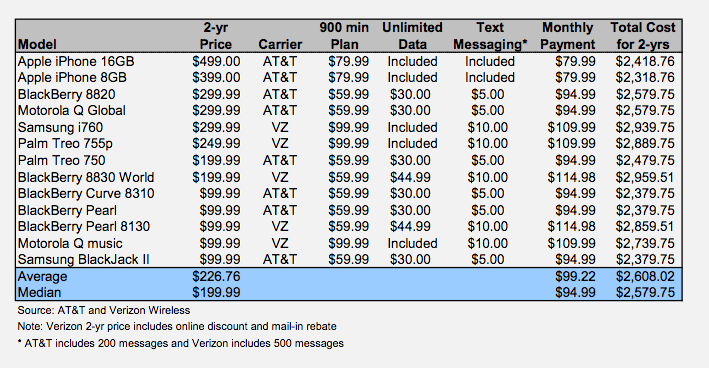
Now that I’ve got your attention, you have to see this chart, which shows that over 2 years, the combined cost of buying and having an iPhone is less than even the inexpensive blackberries and palms. This is, I think, because largely of the great $20 for unlimited data price which is unique to iPhone plans.

iPhone-value-chart.png

I think this is pretty amazing. It really shows that the surface costs are just that, surface. There are many more coming when you own a device like a phone or a computer. Once again, Apple has the long term in mind for its customers, and itself.

justin

PS: this is from a rather bleak prediction of Apple’s market strength, ironically. I’m more optimistic about Apple’s stock than
this guy is:

Category iconBlog,  iPhone

February 24, 2008

iPhone 50 times more popular on Google than other phones

This is an amazing statistic, and one that apparently even surprised Google themselves:

iPhone users use their web browser to search Google 50 times more than any other phone… including Blackberry, Palm, Windows Mobile, everything! That’s amazing, and it shows how much easier it is to use the browser (and the google search) on the iPhone than any other device!

http://www.appleinsider.com/articles/08/02/14/google_iphone_usage_shocks_search_giant.html

justin

Category iconBlog,  iPhone

January 21, 2008

Macworld Best of Show

Well, here is the official list of “Best” products according to the Macworld editors. I agree with many of them and actually blogged about several myself:

My favorites that I actually checked out at the show:
BusySync (iCal sync)
Guitar Hero III (so fun!)
Photoshop Elements (big upgrade v6)
MacBook Air (duh)
Dictate (speech recognition)
OmniFocus (my new favorite to-do app)
Parallels Server (Server virtualization that took a while to grasp but now I get it and love it)

Also on the list are Eye-Fi, a cool Wi-Fi SD card; Flow, a neat idea for content management for designers; NEC 30inch monitor and VectorDesigner, a program that wants to compete with Adobe Illustrator and might well be a part of MacHeist. If you don’t know what MacHeist is, you should… and soon. It’s a package of great shareware tools worth almost $500 for only $49. Check it out at www.macheist.com

Macworld | Editors’ Notes | Macworld Expo Best of Show award winners

http://www.macworld.com/article/131642/2008/01/bos.html

Category iconBlog,  Reviews

January 21, 2008

Open WiFi Networks and personal morality

I have often defended my choice to run an open wireless network at my house (i.e. not put a password to prevent others from using it) so it’s refreshing to see someone else talk about his personal, moral choice to do the same….

» Why I run an open Wi-Fi network | SOHO Networking | ZDNet.com

http://blogs.zdnet.com/soho-networking/?p=119&tag=nl.e539


ps: thus post is not to minimize the need or security in many circumstances. Many businesses need to be safe, secure and make the most of their bandwidth. Here at MacCognoscenti we take that need very seriously and have no problem setting up the toughest and most modern wifi security available. Personally, though I think it is nice and good karma to allow others to sign on without restrictions!

Category iconBlog,  Just fun,  Mac

« Previous Page
Next Page »

Primary Sidebar

Footer

Contact Justin

805-720-9276
[email protected]

  • Justin’s Thoughts on Tech
  • What clients say about Justin
Install Monitoring
Backblaze Online Backup
Get Started with 1Password